1 / 3
Virus checked
v1.0 latest
Free Mod
GE10 Script - SplineToolkit
–
Rating
0 Ratings
435
Downloads
8.9K
Views
0
Thanks
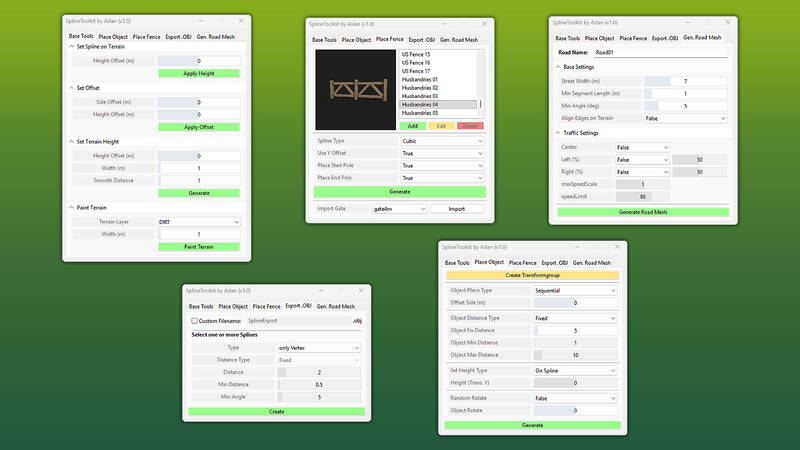
This powerful GIANTS Editor script offers a comprehensive suite of tools for working with splines. Whether you're editing terrain, placing objects or fences, exporting splines as .OBJ files for Blender, or generating road meshes, this tool has it all.
Feature Overview:
1) Base Tools
1.1) Set Spline on Terrain: Project spline points onto the terrain surface with an adjustable offset.
1.2) Set Offset: Move a spline vertically and horizontally using customizable offset values.
1.3) Set Terrain Height: Adjust terrain height to match spline height with precision control options.
1.4) Paint Terrain: Paint terrain along a spline using a structured layer selection.
2) Place Objects: Place objects along a spline with configurable parameters.
3) Place Fence: Easily create complete fence setups with a list of base game fences and preview images.
4) Export as .OBJ: Export splines as .OBJ files for Blender using two methods and additional parameters.
5) Generate Road Mesh: Create road meshes directly from splines for infrastructure creation in Blender. Automatically generate matching traffic splines.
Installation:
1.) Navigate to your GIANTS Editor installation directory. Default path: "C:\Program Files\GIANTS Software\GIANTS_Editor_10.X.X\"
2.) Copy "SplineToolkit.lua" and the "fenceImages" folder into the GIANTS Editor script folder.
3.) Access the script via the GIANTS Editor menu bar under “Scripts”.
Feature Overview:
1) Base Tools
1.1) Set Spline on Terrain: Project spline points onto the terrain surface with an adjustable offset.
1.2) Set Offset: Move a spline vertically and horizontally using customizable offset values.
1.3) Set Terrain Height: Adjust terrain height to match spline height with precision control options.
1.4) Paint Terrain: Paint terrain along a spline using a structured layer selection.
2) Place Objects: Place objects along a spline with configurable parameters.
3) Place Fence: Easily create complete fence setups with a list of base game fences and preview images.
4) Export as .OBJ: Export splines as .OBJ files for Blender using two methods and additional parameters.
5) Generate Road Mesh: Create road meshes directly from splines for infrastructure creation in Blender. Automatically generate matching traffic splines.
Installation:
1.) Navigate to your GIANTS Editor installation directory. Default path: "C:\Program Files\GIANTS Software\GIANTS_Editor_10.X.X\"
2.) Copy "SplineToolkit.lua" and the "fenceImages" folder into the GIANTS Editor script folder.
3.) Access the script via the GIANTS Editor menu bar under “Scripts”.
Comments
You must be logged in to comment.
No comments yet.