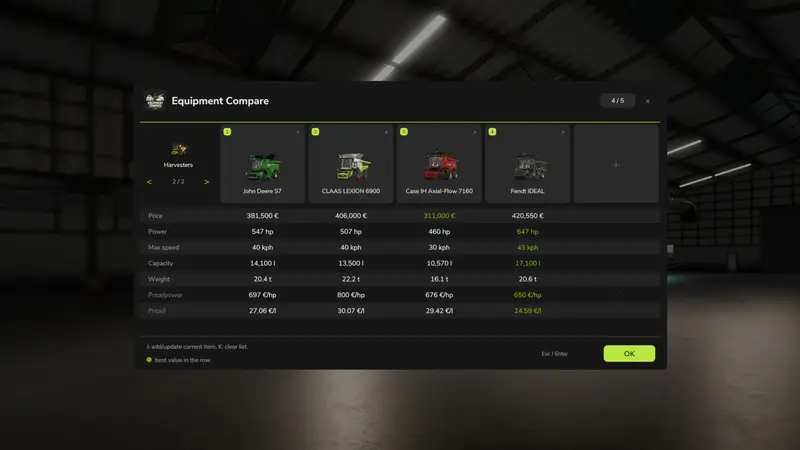
Enhance your gameplay with a compact comparison tool in the hardware store. Open the equipment on the store configuration screen and click the “Compare” button (default key: J) to add it to the comparison list along with the selected configuration. The comparison window opens automatically, displaying all saved positions side by side.
Features:
- Compare up to 5 positions per store category, with each category on a separate page
- Evaluate price, power, max speed, working width, working speed, volume, power required, weight, daily maintenance, and specific figures (price per hp/meter/liter)
- Takes into account the selected configuration (engine, working width, volume, weight, price)
- Highlights the best value in each line in green
- Remove positions individually; adding a sixth position replaces the oldest
- Characteristics not applicable to a vehicle are shown as “n/a”
Controls:
J - Add/update current equipment (store configuration screen)
K - Clear the list
In the comparison window: Use the mouse wheel or up/down arrows to scroll, and left/right arrows to switch category pages.
The comparison list is temporary, existing only in the current game session. It doesn’t persist and doesn’t affect purchases, leasing, prices, or multiplayer rights. Multiplayer is supported.
Comments
You must be logged in to comment.
No comments yet.