
Automatic LCDs 2 German
V 1.0 mod for Space Engineers
0
Downloads today
223
Downloads total
0
Comment Count
description
//////////////////// \\\\\\\\\\\\\\\\\\\\
UPDATE v.1.194 Kompatibel
\\\\\\\\\\\\\\\\\\\\ ////////////////////
Privater Link von DocGalaxy's Dropbox:
https://www.dropbox.com/s/0yatg6h2l7je7eb/Automatic LCDs 2 German.cs?dl=0
Mit der Hilfe von DocGalaxyBlock wurde dieses Skript nun endlich funktionstüchtig. Die Anzeige funktioniert jetzt endlich wie sie soll, falls ihr Anmerkungen oder Kritik für die Übersetzung habt, schreibt hier in die Kommentare. Für Alles bezüglich des Skripts selbst wendet euch bitte an MMaster, er hat das Original-Skript geschrieben.
Dies ist die deutsche Übersetzung des Original-Scripts von MMaster. Das englische Original findest du hier:
Automatic LCDs 2
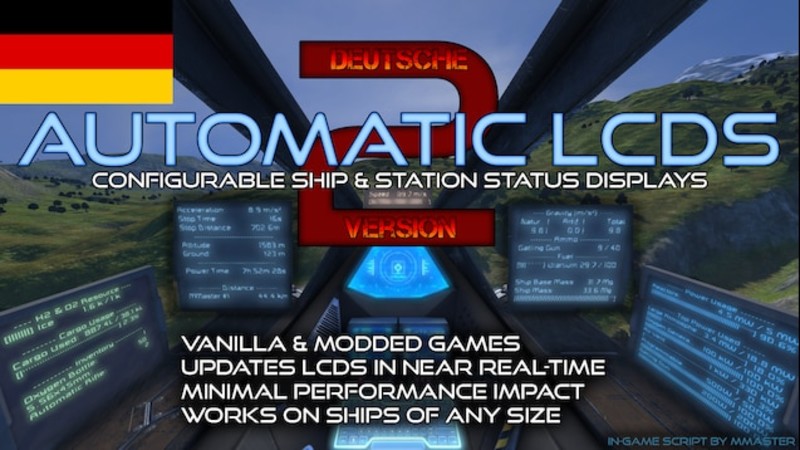
Alles was du jemals über dein Schiff oder deine Station wissen wollen wirst kann in Echtzeit auf LCDs angezeigt werden!
= = = = = = = = = = = = = = = = = = = = = = = = = = = = = = = = = = = = = = = = =
Das Skript nutzt für Befehle die "Custom Data" Box im Terminal der Anzeige.
"Private Text" wird ab jetzt ignoriert!
= = = = = = = = = = = = = = = = = = = = = = = = = = = = = = = = = = = = = = = = =
Schau dir das Video an, um einen Einstieg in die Funktionen zu erleichtern, selbst wenn du kein Englisch verstehst kannst du so sehen wie man alles vorbereitet und konfiguriert:
https://youtu.be/vqpPQ_20Xso
##################################################
Lies die ausführliche Anleitung (englisch);:
http://steamcommunity.com/sharedfiles/filedetails/?id=407158161
##################################################
Kompletter Neuentwurf des Skriptkerns:
- aktualisiert so viele LCDs wie möglich, so schnell wie möglich
- kann auf Schiffen jeder Größe verwendet werden
- gibt niemals den "Script too complex" Fehler aus
- funktioniert auch ohne Timer Block
- viele neue Funktionen (siehe Change Notes über den Screenshots)
Bearbeitet mehrere LCDs abhängig der Befehle in "Custom Data"
Stabil und immer auf dem neuesten Stand mit Space Engineers!
Sprungantrieb Statusanzeige und Ladestand
Sauerstoffdruck, Sauerstofffarm-Leistung & Tankdruckanzeige!
Liste beschädigter Blöcke mit Integritätsanzeige!
Filter für Inventarlisten & Listen fehlender Komponenten
Reaktor, Solar & Batterie Leistungsanzeige
Block-Detailanzeige
Statusanzeige für Türen, Fahrwerk und Verbinder
Munitionsanzeige
Einstellbarer Scroll durch lange Texte
Verbinde mehrere LCDs!
Funktioniert auf LCD, Breitem LCD, Textanzeige und gemoddeten Blockdisplays.
Jede Schriftgröße funktioniert!
Filtert Blöcke nach Name oder Gruppe
Frachtraumanzeige!
Zählt Blöcke
Zusammenfassung der Blöcke nach Status: An, Aus, Standby, erzeugend
Status der Laserantenne
Anzeige von Stoppweg und Stoppzeit
Position, Geschwindigkeit, Beschleunigung, Datumsanzeige, Gravitation
Gut formatierte Texte mit Fortschrittsanzeige
Mehrere Befehle auf einem Bildschirm
Funktioniert auf jedem Server!
KEINE PROGRAMMIERKENNTNISSE BENÖTIGT.
~~~~~~~~~~~~~~~~~~~~~~~~~~~~~~~~~~~~~~~~~~~~~~~~~~~~~~~~~~~~~~~~~~~~~~~~~~~~~
Jeder Kapitän will Bildschirme mit nützlicher Information jederzeit zugänglich haben. Bekomme auf der Brücke beschädigte Blöcke im Maschinenraum oder Hangar, etc. angezeigt. Verbinde mehrere Bildschirme zu einem Großen! Erhalte Informationen über Gesamtleistung, Batteriestatus, oder Verbindungen der Laserantennen. Lass dir im Dock anzeigen welche Fahrwerke belegt sind. Mit einem Bildschirm pro Frachtbox kannst du direkt seinen Inhalt sehen.. Und vieles mehr!
~~~~~~~~~~~~~~~~~~~~~~~~~~~~~~~~~~~~~~~~~~~~~~~~~~~~~~~~~~~~~~~~~~~~~~~~~~~~~
English Infos:
French version (UPDATED)
Thanks a lot to =SW42=Hydeki_ for translating:
http://steamcommunity.com/sharedfiles/filedetails/?id=822980231
Spanish version (UPDATED)
Thanks a lot to Makarov for translating:
http://steamcommunity.com/sharedfiles/filedetails/?id=698634650
Russian version (UPDATED)
Thanks a lot to Alex2K for translating:
http://steamcommunity.com/sharedfiles/filedetails/?id=787082314
STEAM GROUP
I usually notify about updates on twitter & recently I created Steam group so follow/join if interested.
http://steamcommunity.com/groups/mmnews
~~~~~~~~~~~~~~~~~~~~~~~~~~~~~~~~~~~~~~~
CHECK MY OTHER MODS (almost all 5 star)
http://steamcommunity.com/id/mmaster/myworkshopfiles/?browsefilter=myfiles
~~~~~~~~~~~~~~~~~~~~~~~~~~~~~~~~~~~~~~~
Please DO NOT publish this script or its derivations without my permission! Feel free to use it in blueprints!
THE SCRIPT IS PROVIDED "AS IS", WITHOUT WARRANTY OF ANY KIND, EXPRESS OR IMPLIED, INCLUDING BUT NOT LIMITED TO THE WARRANTIES OF MERCHANTABILITY, FITNESS FOR A PARTICULAR PURPOSE AND NONINFRINGEMENT. IN NO EVENT SHALL THE AUTHORS OR COPYRIGHT HOLDERS BE LIABLE FOR ANY CLAIM, DAMAGES OR OTHER LIABILITY, WHETHER IN AN ACTION OF CONTRACT, TORT OR OTHERWISE, ARISING FROM, OUT OF OR IN CONNECTION WITH THE SCRIPT OR THE USE OR OTHER DEALINGS IN THE SCRIPT.
HOW TO UPDATE?
This script is not a mod so it does not update by itself. You need to load new version of script to your programmable block to overwrite the old one. You do that in exactly the same way as when you first loaded the script into programmable block.
Open your programmable block, click Edit, click Browse Workshop, select Configurable Automatic LCDs, click OK, Check code, Remember & Exit. Done. Your script is now updated.
RATING
If you like this script please give it positive rating, it gives me "fuel" to continue.
If you plan to give it negative rating, please at least let me know what makes it so horrible that it deserves negative rating so I can learn from the mistake and/or fix it.
!! PLEASE READ THIS !!
I'm really happy that this script became so popular and that so many people like it, but many people means many questions and I rather enjoy other things than saying the same things all over again to people. So I wrote the guide where I've put everything about every command, tried to answer all questions that people had in comments and I keep it updated. I'm responding to many comments that are obviously stated in the guide. Please please read the guide.
If you've got questions, but you don't want to read the guide, then this script is probably not for you.
I understand that this script got quite a lot of features and it can be hard to crunch whole guide. Unfortunately I can't teach everyone how to use it via chat. It took me several hundreds of hours to put this all together so please take your time to read the guide and follow the troubleshooting section if something doesn't work.
If you have problem with some command then read the guide section for that command and make sure you use it correctly. Try to use it on separate LCD by itself so it's easier for you to see the issue and definitely try some examples!
You are the space engineers so go ahead and play with it and figure it out :)
Thank you very much for your understanding.
TROUBLESHOOTING
*
ALWAYS CHECK OWNERSHIP OF YOUR BLOCKS!
*
Look at Troubleshooting section in Full guide for possible help. Read the guide again and be extra extra careful about each step, always check your command syntax, try the examples and read the troubleshooting section.
Special Thanks
Keen SWH for awesome game Space Engineers
Malware for his work on programmable block
Textor and CyberVic for their great script related contributions on Keen forums.
Watch my Steam group: http://steamcommunity.com/groups/mmnews
Twitter: https://twitter.com/MattsPlayCorner
and Facebook: https://www.facebook.com/MattsPlayCorner1080p
for more crazy stuff from me in the future :)
Credits
-
19 Jan 21:36Version 1.0
Files

19.01 2021
V
1.0
19. 01 2021
223

0 Comments for Automatic LCDs 2 German